
How to Save Recipes from Instagram Reels, Step by Step (Free, 2026)
To save recipes from Instagram, tap Save under a post (on a Reel, tap Options, then Save), and tap and hold Save to file it in a Collection. That only bookmarks the post, though, and the recipe itself is often spoken in the video, buried in the comments or behind the link in bio. To keep a written recipe you can search and cook from, share the Reel or the recipe link to a recipe app like Miga, which turns it into ingredients, amounts and steps.
Saving recipes from Instagram takes one tap. Getting the actual recipe back when you’re standing in the kitchen is the hard part. This guide covers both: how Instagram’s Saved and Collections work today, where the recipe is really hiding in a Reel, and how to turn it into something you can search, plan and cook from.
How to save recipes from Instagram in Collections
Instagram lets you save any post or Reel to a private section of your profile and sort it into Collections. It’s free and it’s built into the app on iPhone and Android.
- Open the recipe. It works the same for photo posts, carousels and Reels.
- Tap Save. On a feed post, the Save button sits below the post. On a Reel, tap Options (the three dots) and then Save.
- Tap and hold Save to choose a Collection. A quick tap drops the post into your general saves. Holding it lets you pick a Collection or tap New collection.
- Name Collections for how you cook. “Weeknight Dinners,” “Sheet Pan,” “Meal Prep,” “Holiday Baking.” Specific names beat one giant “Recipes” folder.
You can also build a Collection from posts you’ve already saved: open Saved, tap New collection in the top right, name it and pick the posts.
How to find saved recipes on Instagram
Your saved recipes live behind the menu on your profile:
- Tap Profile or your profile picture in the bottom right.
- Tap Menu in the top right.
- Below How you use Instagram, tap Saved.
Only you can see what you’ve saved, and the creator isn’t notified. Saving to Collections isn’t available on a computer, so do it from the app.
Where the recipe actually is in an Instagram Reel
Most recipe Reels don’t put the full recipe in one place. Before you save, figure out where this one lives, because that decides how you’ll keep it.
- In the caption. The best case. Tap “more” under the Reel and you’ll often find the full ingredient list and steps.
- Said out loud or flashed on screen. Very common. The creator says “two tablespoons of gochujang” once, or the amounts appear for a second. You end up pausing and scrubbing every time you cook.
- In the first comment. Some creators pin the recipe as a comment because the caption ran out of room.
- Behind the link in bio. “Full recipe on my blog, link in bio.” The Reel is the trailer; the recipe is on a website.
- Sent by DM. Some accounts ask you to comment a keyword and they send the link by direct message.
Saving the Reel to a Collection doesn’t capture any of that. It saves the post, not the recipe.
Why Instagram Collections aren’t enough for recipes
Collections are good bookmarks and bad cookbooks. Here’s where they fall short once you have more than a handful of saves:
- No search by ingredient. You have half a rotisserie chicken and 400 saves. There’s no way to search “chicken” inside your Collections.
- The amounts aren’t written down. If the recipe is only in the video, you’ll be pausing the Reel with flour on your hands.
- You depend on the post staying up. Your Saved folder points to the original. If the creator deletes or archives it, or switches the account to private, you may lose it.
- No grocery list, no meal plan. Everything you want to cook still has to be copied somewhere else by hand.
How to turn an Instagram Reel into a written recipe
There are three ways to get the recipe out of a Reel, from most manual to fastest.
1. Copy the caption into your notes
If the full recipe is in the caption, press and hold the text, copy it and paste it into your notes app. It’s free and it works, but only when the creator wrote everything down, and your notes app turns into one more unsorted pile.
2. Screenshot every step
This is what most people do. The problem: recipe screenshots get mixed in with the rest of your camera roll, and you can’t search them by ingredient.
3. Share the Reel to a recipe app (the fastest way)
A recipe app like Miga turns the Reel into a written recipe with ingredients, amounts and steps:
- On the Reel, tap Share (the paper airplane).
- Pick Miga from the list of apps.
- Miga reads the video and its caption, and a few seconds later the recipe is saved in your recipe box, with a photo.
If the recipe is on the creator’s blog, open the link in bio and share that page to Miga instead. Miga works with any recipe website, so the full recipe from the blog ends up next to your Reels. It also works with TikTok, YouTube, Pinterest and Facebook, so you’re not keeping recipes in five different apps.
How to organize your Instagram recipes once they’re saved
Once the recipe is written out, organizing it is a lot easier than in Instagram:
- Collections your way: desserts, weeknight dinners, Grandma’s classics.
- Search by ingredient: type “basil” and every recipe that uses it shows up.
- It stays saved even if the video gets deleted: the ingredients and steps live in Miga, not on the creator’s account.
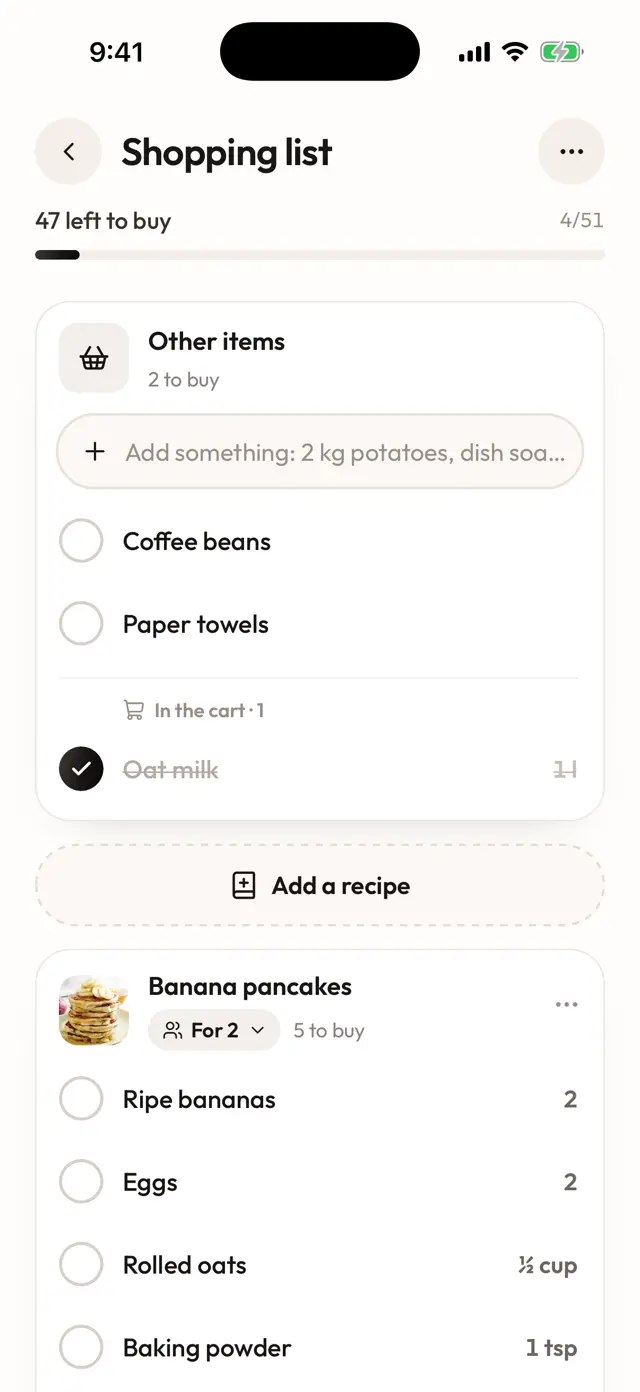
- Meal plan and grocery list: pick breakfast, lunch and dinner for each day, then send those days to your list. Ingredients land grouped by recipe, with their servings, and you check them off as you shop.
- Cook mode: one step at a time in big type, with a timer on each step, and the screen stays on.
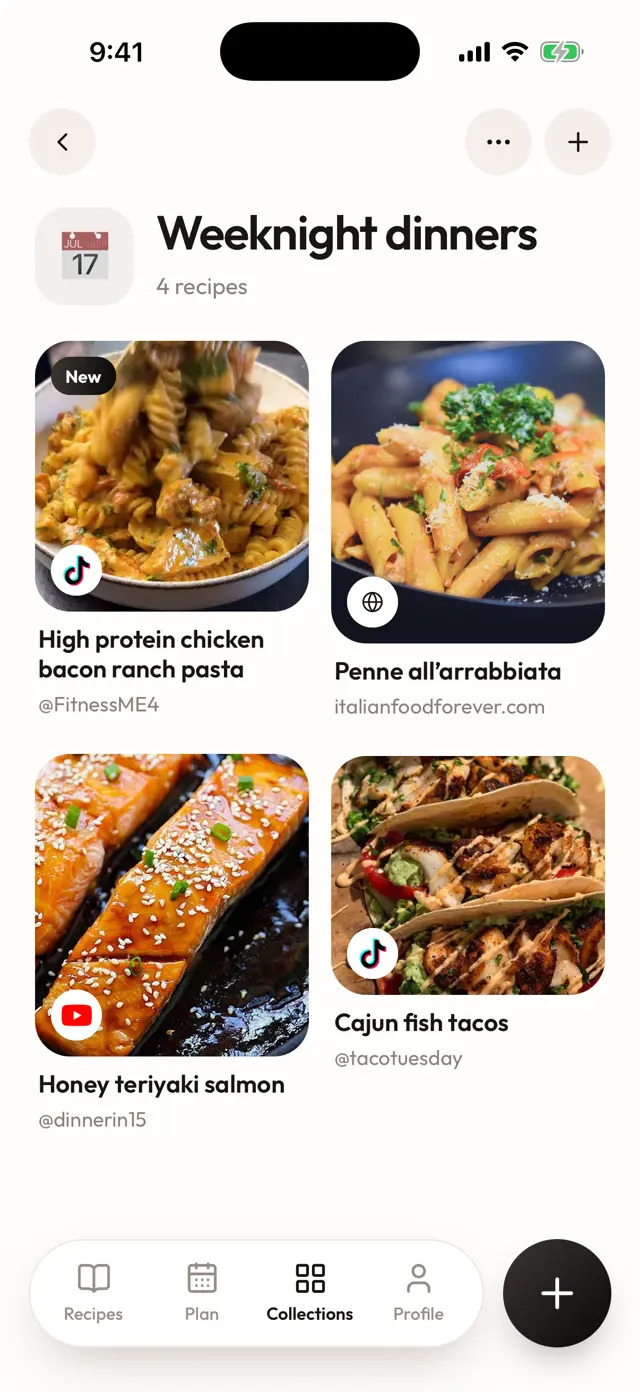
Need to feed six instead of four? Change the servings and the amounts are recalculated. If you want to send a recipe to someone, share it with a link; they can open it even if they don’t have Miga.
Common problems when saving recipes from Instagram
“I can’t find Saved.” It’s inside the menu, not on the profile grid. Go to your profile, tap Menu in the top right and look below How you use Instagram. If it’s still not there, update Instagram from the App Store or Google Play.
“There’s no Save button under the Reel.” On Reels, Save lives in Options (the three dots). Tap it there.
“I saved the Reel but it’s gone.” The creator deleted or archived it, or their account went private. Instagram doesn’t keep a copy for you. Next time, save the recipe as text as soon as you find it.
“The recipe isn’t in the caption.” Check the first comment and the link in bio before you save. If the recipe is on a blog, save that page, not just the Reel.
“I have hundreds of saves and no system.” Create four or five broad Collections and only move the recipes you’ll actually make. Leave the rest where they are, and import the keepers into a recipe app so you can search them.
Join the Miga waitlist
Miga, the AI recipe app, launches in November 2026 for iPhone and Android. Join the waitlist on the home page and have your Instagram recipes organized from day one.
Frequently asked questions
How do I find saved recipes on Instagram?
Tap Profile or your profile picture in the bottom right, tap Menu in the top right and, below How you use Instagram, tap Saved. Your saved posts and Collections are all there. Only you can see them, and the creator isn't told that you saved their post.
Are Instagram Collections enough to save recipes?
They work as bookmarks, but they don't hold the recipe itself. You can't search them by ingredient, the amounts are often only said in the video, and you depend on the original post staying up. Collections are fine for inspiration; for cooking, keep a written copy.
How do I get the recipe out of an Instagram Reel?
Check the caption first, then the creator's first comment, then the link in bio. If the recipe is in the caption, you can copy it by hand. A recipe app like Miga reads the Reel and its caption and writes out the ingredients, amounts and steps for you.
Can I save recipes from Instagram for free?
Yes. Saving to Collections is free and built into Instagram. Miga is a paid subscription with a free trial, and it imports from Instagram, TikTok, YouTube, Pinterest, Facebook and recipe websites; the price depends on your country. It launches in November 2026 on iPhone and Android.
What happens to my saved recipe if the creator deletes the Reel?
Your Saved folder points to the original post, so if the creator deletes or archives it, or makes their account private, you may lose access to it. A recipe you've imported into Miga stays saved, ingredients and steps included, even if the video is gone.