TikTok Recipe Converter: Turn Any TikTok or Instagram Video into a Written Recipe
Miga works as a TikTok recipe converter: share a TikTok, Instagram or YouTube video to Miga and its AI reads the video and caption and separates the ingredients, amounts and steps into a written recipe. It is an app for iPhone and Android, not a website, and it launches in November 2026.
A TikTok recipe converter should do one thing: take the video you just watched and hand back a recipe you can cook from. Miga, an AI recipe app for iPhone and Android, does it from the Share button, with no copying and no pausing.
How the TikTok recipe converter works in 3 steps
Converting a video into a recipe in Miga takes three taps, and you never leave TikTok, Instagram or YouTube.
- Share the video. On the recipe video, tap Share. It works with TikTok, Instagram, YouTube, Pinterest, Facebook and any recipe website.
- Choose Miga. It shows up in your phone’s list of apps. Miga is an app, not a web page, so there is no link to paste anywhere.
- Get the recipe. The AI reads the video and its caption and separates the ingredients, amounts and steps. The recipe lands in your recipe box with a photo, ready to drop into a Collection.
What problem it solves
Recipe videos are rarely written down, and that is where recipes get lost. You probably know the pattern:
- Amounts go by fast. The creator says “a tablespoon of gochujang” once, or the quantities flash on screen for a second.
- The caption has half the recipe, or just says “full recipe in the first comment.”
- You can’t search by ingredient across your saved videos.
- If the creator deletes the video, the recipe is gone. With the written recipe in Miga, the ingredients and steps stay even if the video disappears.
Copying the caption or taking screenshots helps only when the recipe is already written somewhere. Miga pulls it out of the video itself.
Recipe from video with AI: TikTok, Instagram and YouTube
Each platform has its own share button, and the result is the same.
- TikTok: Share, then Miga. Our guide to saving recipes from TikTok also covers Favorites and Collections.
- Instagram: Share (the paper airplane), then Miga. The guide to saving recipes from Instagram covers Saved and Collections too. Miga works as an Instagram recipe extractor for Reels and posts.
- YouTube: Share, then Miga, for long videos and Shorts.
Use cases
Once the recipe is text, it stops being a bookmark and becomes something you cook from.
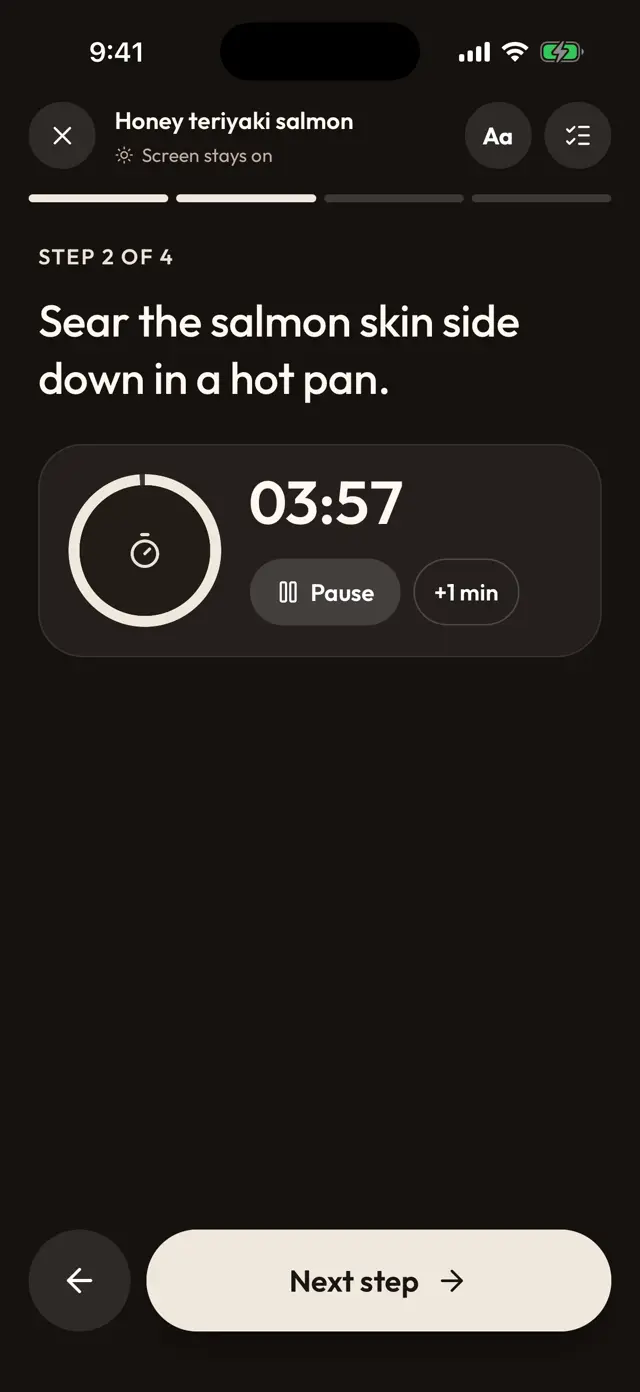
- Cook without pausing: cook mode shows one step at a time in big type with a timer on each step, and the screen stays on.
- Change the servings: cooking for six instead of four recalculates the amounts.
- Foreign-language recipes: translate a recipe into your language with the iPhone translator.
- From video to groceries: add the recipe to the weekly plan and send the ingredients to the grocery list, grouped by recipe with their servings.
- Find it later: search by ingredient and sort everything into Collections.
If you are still choosing an app, see our comparison of the best apps to save recipes from social media.
What Miga includes
Miga is a paid subscription with a free trial. The price depends on your country.
| Miga | |
|---|---|
| Converting videos and links to recipes | Yes |
| Collections and ingredient search | Yes |
| Weekly plan and grocery list | Yes |
| Cook mode with timers | Yes |
| Recipes from cookbook photos and handwritten notes | Yes |
| Nutrition per serving | Yes |
| Price | Free trial, then subscription (depends on your country) |
Miga launches in November 2026 for iPhone and Android. Join the waitlist on the home page to have it on day one.
Frequently asked questions
How do I turn a TikTok video into a written recipe?
On the video, tap Share and choose Miga. The AI reads the video and its caption and gives you the recipe with ingredients, amounts and steps, saved in your recipe box.
Is this a website where I paste a link?
No. The converter is a feature inside the Miga app for iPhone and Android. You use it from the Share button of TikTok, Instagram or YouTube, so there is nothing to download or paste into a web page.
Does it work with Instagram Reels and YouTube Shorts?
Yes. You can share videos from TikTok, Instagram, YouTube, Pinterest and Facebook, and pages from recipe websites, with the same Share button.
How does the AI get the ingredients and amounts?
Miga uses AI to read the video and its description and separate ingredients, amounts and preparation. If a creator is vague about a quantity, check the recipe against the video before you cook.
Is the recipe converter free?
Miga is a paid app with a subscription, and the price depends on your country. You can try it free first, and if you cancel during the trial you are not charged.
When does Miga launch?
Miga launches in November 2026 for iPhone and Android. There is a waitlist at getmiga.app.