How to Save Recipes from TikTok on iPhone and Android (Free, 2026)
To save recipes from TikTok, tap the bookmark (Favorites) icon on the video, then file it in a Collection from your profile. That only bookmarks the video, and the amounts are often just spoken or flashed on screen. To keep a written recipe, share the video to a recipe app like Miga, which turns it into ingredients, amounts and steps on iPhone or Android.
Saving a TikTok takes one tap. Finding the recipe again while you’re standing at the stove is the hard part. This guide shows how Favorites and Collections work on iPhone and Android, why recipes get lost in them, and how to turn a TikTok into a written recipe you can search, plan and cook from.
How to save recipes from TikTok with Favorites
TikTok keeps every video you bookmark in the Favorites tab of your profile. It’s free and built in, on both iPhone and Android.
- Open the recipe video. It works the same for videos and photo slideshows.
- Tap the bookmark icon. It’s in the column of icons on the right, next to the heart and comments. If your version hides it, look for Add to Favorites under Share.
- File it in a Collection. From your profile, open Favorites, tap Collections and create one with a clear name: “20-Minute Dinners”, “Desserts”, “Sunday Meal Prep”.
- Check your saved videos. They’re in the bookmark tab on your profile. Only you can see them.
Menu names shift between app versions. If something looks different, update TikTok from the App Store or Google Play.
Why TikTok recipes get lost in Favorites
Favorites is a bookmark folder, not a recipe box. After a few dozen saves you’ll run into the same problems:
- No ingredient search. You have 200 saved videos and half a rotisserie chicken. You can’t search “chicken” across them.
- The recipe isn’t written down. Many creators say the amounts quickly or flash them on screen for a second, so you keep scrubbing back.
- You depend on the video. If the creator deletes it or the account changes, you may lose access. Favorites stores a link, not a copy.
- No grocery list. You retype ingredients into another app.
How to turn a TikTok into a written recipe
There are three ways to get the recipe out of a video, from slowest to fastest.
1. Copy the caption
If the creator wrote the recipe in the caption, press and hold the text, copy it and paste it into Notes. Check the pinned comment too, since the full recipe is sometimes there.
2. Screenshot each step
Most people do this. The screenshots end up between your vacation photos, you can’t search them, and you still have no ingredient list.
3. Share the video to a recipe app (the fastest way)
A recipe app like Miga reads the video and its caption and turns it into a recipe with ingredients, amounts and steps:
- In TikTok, tap Share.
- Pick Miga from the list of apps.
- In a few seconds the recipe is written out, with a photo, in your recipe book.
You don’t download the video or copy links. If the full recipe lives on the creator’s blog, share that page to Miga instead.
How to organize your TikTok recipes in an app
Once the recipe is text, it’s much easier to use than a pile of bookmarks:
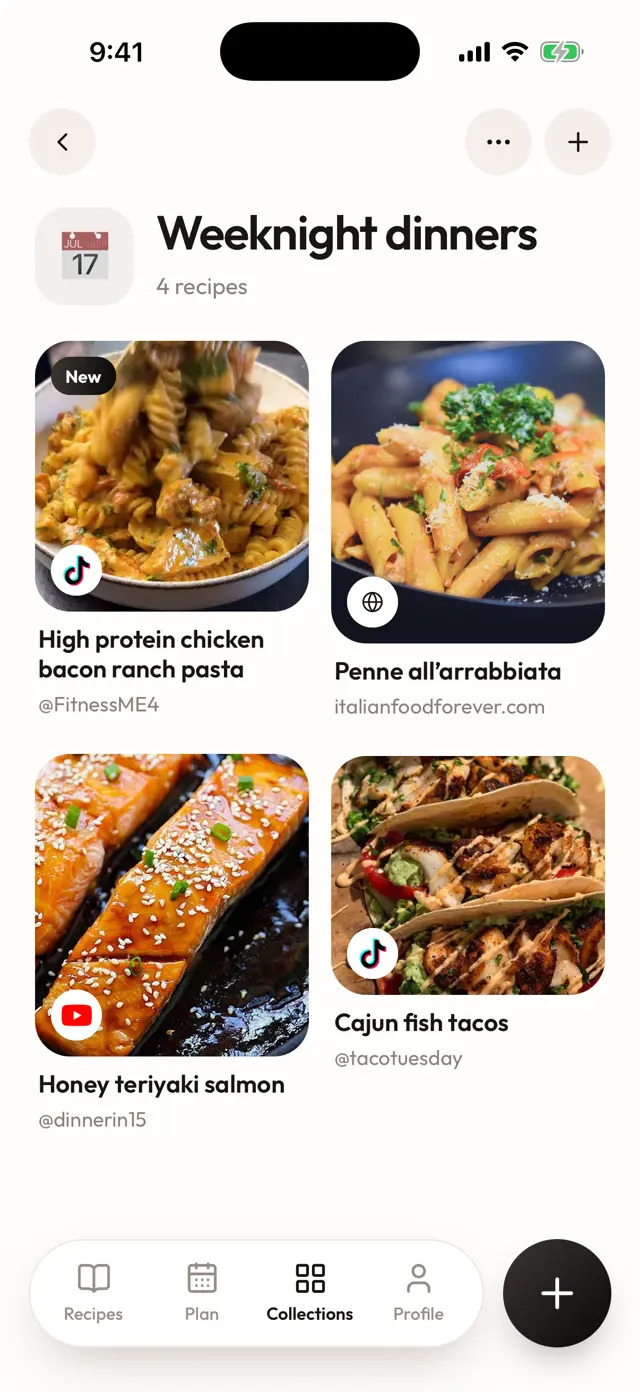
- Your own Collections: comfort food, weeknight dinners, things to try this weekend.
- Ingredient search: type “avocado” and every recipe that uses it comes up.
- The recipe stays, even if the video disappears.
- Weekly plan and grocery list: plan breakfast, lunch and dinner for each day, then send the recipes to your list. Ingredients land grouped by recipe with their servings, and you check them off at Trader Joe’s or Kroger.
- Change servings: cooking for six instead of four recalculates the amounts.
- Cooking mode: one step at a time, big text, timers on each step, and the screen stays on.
If you also save from Instagram, read the guide to saving recipes from Instagram. The Miga home page explains how it works and how to join the waitlist.
Common problems when saving TikTok recipes
“I can’t find my Favorites.” They’re in the bookmark tab on your profile. If it’s missing, update the app.
“I saved the video and now it’s gone.” The creator may have deleted it or made it private. Save the recipe as text as soon as you find it.
“The video doesn’t give amounts.” Check the caption and comments before saving. If they’re not there, share the video to an app that reads the video itself.
“I have hundreds of saved videos.” Create four or five big Collections and move only the recipes you’ll actually cook.
“How much does it cost?” Saving in TikTok is free. Miga is a subscription with a free trial, and the price depends on your country.
Join the Miga waitlist
Miga, the AI recipe app, launches in November 2026 for iPhone and Android. Join the waitlist on the home page and have your TikTok recipes organized from day one.
Frequently asked questions
Where are my saved recipes on TikTok?
Go to your profile and open the tab with the bookmark icon (Favorites). Your saved videos are there, and your Collections are inside it. Menu names can differ slightly between app versions.
How do I save a TikTok recipe that has no written recipe?
Check the caption and the pinned comment first. If the recipe is only in the video, share it to a recipe app like Miga, which reads the video and its caption and writes out the ingredients, amounts and steps.
What happens to my saved recipe if the creator deletes the video?
You may lose access, because Favorites keeps a link to the video inside TikTok, not a copy of the recipe. A recipe imported into Miga stays saved, ingredients and steps included, even if the video is gone.
Can I save TikTok recipes for free?
Yes. Favorites and Collections are free in TikTok. Miga is a paid subscription with a free trial, and it imports from TikTok, Instagram, YouTube, Pinterest, Facebook and recipe websites; the price depends on your country. It launches in November 2026 on iPhone and Android, and there is a waitlist now.
Is saving recipes from TikTok different on iPhone and Android?
Saving in TikTok works the same on both. With Miga, you tap Share in TikTok and pick Miga on either phone.