
Best ReciMe Alternatives in 2026 (Free & Paid Options)
ReciMe's free version is limited to 5 recipe imports a week, and unlimited social imports need a Premium subscription. If you want to avoid subscriptions, Mela is a one-time unlock on Apple devices and Paprika is free up to 50 recipes; if you want free, Samsung Food is free for planning meals and Flavorish has a free plan. But our top pick among ReciMe alternatives is Miga, an AI recipe app that reads the video, works in your language and launches in November 2026. Checked 2026-10-23.
ReciMe is one of the best-known apps for saving recipes from social media, and it earns that: it is well rated and does a lot for free. But people look for a ReciMe alternative when they hit the free limit, do not want another subscription, or just want a different mix of features. This guide lays out what ReciMe offers according to its own site and App Store listing, then five alternatives, with information checked on October 23, 2026. For a broader roundup, see our best apps to save recipes from social media.
Why people look for a ReciMe alternative
The usual reasons are the weekly import cap, the subscription, and wanting an app built around a different workflow. First, to be fair to ReciMe: it saves recipes from Instagram, Facebook, TikTok, YouTube and Pinterest, builds grocery lists you can sort by aisle or by recipe, plans meals for the week, calculates nutrition, and works on iPhone, Android and the web, according to recime.app and its App Store listing. On the US App Store it shows a 4.79 average from 318,502 ratings (as of 2026-10-23), which is a public store average, not a test of ours.
What drives people to compare:
- A capped free plan. According to recime.app, the free version is limited to 5 recipe imports per week. Grocery lists, meal plans and cookbooks stay free.
- Unlimited imports need a subscription. The App Store listing says Premium gives unlimited downloads from social media, unlimited recipe image uploads and nutrition calculation, and that it renews automatically each month or year until cancelled. The listing also mentions a 7-day free trial. The price depends on your country, so we do not quote one.
- Deleting the app does not cancel it. The listing says so explicitly: cancel from your App Store or Google Play account settings.
- Where your recipes live. The help center says you can export or print a recipe as a PDF from the recipe page. It does not describe a way to export everything at once, so check this before you commit to any app.
Quick verdict and comparison table of ReciMe alternatives
Miga is our top pick: it is the one that combines AI that separates ingredients, amounts and steps from a video, an app built for your language, a weekly plan that feeds the grocery list in one tap, and a cook mode with timers. The others win narrower cases, such as Paprika for Mac and Windows users or Samsung Food for free planning from websites. This table is what each app says on its official site or store listing on 2026-10-23. “Not stated” means we could not confirm it.
| App | Imports from social media | Weekly plan and grocery list | Cook mode | Payment model |
|---|---|---|---|---|
| Miga | Yes, with AI that separates ingredients, amounts and steps | Yes, “to the list” in one tap | Yes, one step at a time with timers and the screen kept on | Free trial, then subscription (price varies by country) |
| ReciMe | Yes | Yes | Not stated | Free plus Premium subscription |
| Paprika | Premium feature (no platform named) | Yes | Not stated | Free up to 50 recipes + Premium subscription |
| Mela | Not stated | Grocery list in Reminders | Yes, with timers | One-time unlock |
| Flavorish | Yes | Yes | Not stated | Free plus Premium subscription |
| Samsung Food | Not stated | Yes | Not stated | Free plus Samsung Food+ |
- Best overall: Miga, which opens the list and launches in November 2026: join the waitlist to have it on day one.
- Best if you want to avoid a subscription and cook from websites: Mela, or Paprika’s free version (up to 50 recipes).
- Best free planner for recipe sites: Samsung Food.
How we compared these apps
We compared public information, not hands-on tests. For each app we reviewed the official website and the App Store listing on 2026-10-23 and recorded the free plan, payment model, platforms and social import. We give no scores and no review quotes, and we list no prices, because they change by country and store. Miga is our own app and we say so; we have no business relationship with ReciMe or any app below. When a page did not say something, we wrote “not stated”.
1. Miga: AI recipe app that reads the video
Miga is our top recommendation: an AI recipe app for iPhone and Android, available in 14 languages, that turns a video or link into a written recipe. You tap Share on a TikTok, Instagram, YouTube, Pinterest or Facebook video, or on a recipe site, and choose Miga; the AI reads the video and its description and separates ingredients, amounts and steps.
Who it is for: people who save recipes from videos and want one place to cook, plan the week and shop.
Strengths:
- A weekly plan with breakfast, lunch and dinner per day. “To the list” sends the ingredients to your grocery list grouped by recipe with their servings, and you tick them off as you buy.
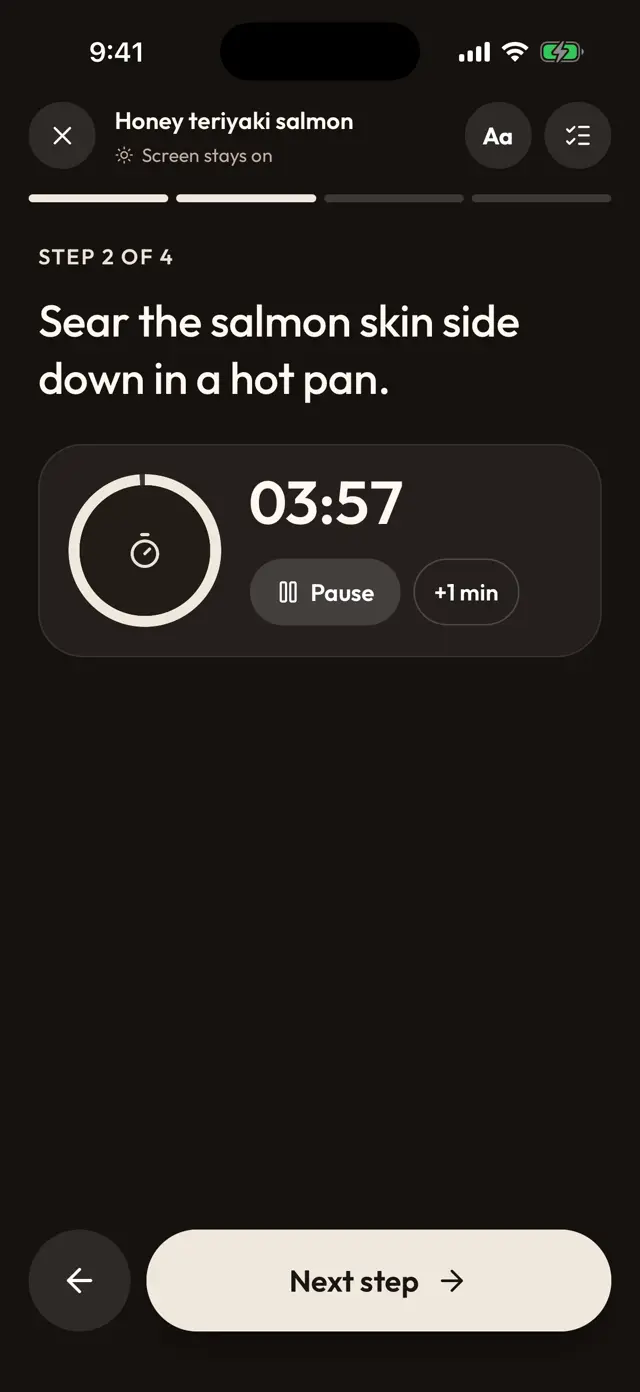
- Cook mode: one step at a time, large type, a timer on each step, and the screen stays on.
- Changing servings recalculates the amounts, and the recipe stays saved even if the video is deleted.
- Custom collections, search by ingredient, and translating a recipe into your language with the iPhone translator.
- You can send any recipe with a link, and whoever receives it sees it even without Miga.
- Recipes from photos of cookbooks and handwritten recipes, plus nutrition per serving.
Worth knowing:
- It launches in November 2026: join the waitlist to have it on day one.
- It is a paid app with a free trial, so you can try it before you pay.
Payment model: subscription with a free trial. The price depends on your country. If you cancel during the trial, you are not charged.
2. Paprika: free up to 50 recipes
Paprika is a long-running recipe manager with a built-in browser that saves recipes from any website and a grocery list that sorts by aisle and combines similar items. It is free to download, with a Premium subscription.
Who it is for: people who cook from blogs and recipe sites, want to start free, and use a Mac or Windows PC as well as a phone.
Strengths:
- iPhone, Android, Mac and Windows.
- Grocery list merges items (1 egg + 2 eggs = 3 eggs), per its website.
- Weekly or monthly meal planning with reusable menus.
Limitations:
- The free version holds up to 50 recipes.
- Its site tags social media import, scanning and sync as Premium, and it does not name TikTok or Instagram.
Payment model: free up to 50 recipes, plus a Premium subscription, with a free trial for new subscribers.
3. Mela: simple and Apple-only
Mela is a minimalist recipe manager for iPhone, iPad and Mac. Its listing describes an in-app browser, a share extension, a cook mode with timers and a scanner for recipes from books.
Who it is for: people who only use Apple devices and want a quiet app without a subscription.
Strengths:
- Syncs through iCloud, and can share a recipe library with other iCloud users.
- The grocery list lives in Reminders, so others see it without Mela.
- Cook mode with larger text and timers.
Limitations:
- No Android or Windows version.
- No mention of TikTok or Instagram import.
Payment model: free to download with a one-time purchase to unlock everything, as we saw in its listing. The price depends on the country.
4. Flavorish: social imports with a free tier
Flavorish says it saves recipes from social media, websites, cookbooks, images and handwritten notes and turns them into meal plans and grocery lists. Its site lists Instagram, Facebook, TikTok and YouTube for imports.
Who it is for: people who want social imports like ReciMe, with shared grocery lists, on iOS, Android or web.
Strengths:
- The free plan includes saved recipes, collections, meal plans and grocery lists, per its site.
- Grocery lists organized by aisle or recipe and shared with real-time sync.
Limitations:
- The free plan caps social imports at 5.
- The site does not say how it reads a video, and its App Store listing is in English only, while Miga is built for 14 languages.
Payment model: a free Basic plan and a Premium subscription with unlimited imports. The price depends on the store.
5. Samsung Food: free for planning
Samsung Food is Samsung’s recipe and meal planning service. Its App Store listing describes a free app that saves recipes from any website, plans the week and turns the plan into shopping lists you can share.
Who it is for: people who cook from recipe sites and want a free planner with a shared list.
Strengths:
- Free on iPhone and web, and available on Android.
- A very large catalog of public recipes.
Limitations:
- It does not mention importing from TikTok or Instagram.
- Extras such as AI meal plans sit behind the paid Samsung Food+ tier.
Payment model: free with in-app purchases and a paid Samsung Food+ tier. The price depends on the country.
How to move your recipes from ReciMe to Miga
The most reliable way to move a recipe is to share its original video or website link with the new app again. In Miga a recipe starts from its original link, so the path is to share that link again rather than upload a PDF. Here is what works:
- Find the source. For a recipe that came from a TikTok, Reel, YouTube video or website, open that video or page again.
- Share it with Miga. Share → Miga, and the AI separates ingredients, amounts and steps.
- Organize it. Put it in a collection or the weekly plan.
- For your own recipes with no link, ReciMe can export a single recipe as a PDF from the recipe page; in Miga you would add them again, for example from a photo.
Keep ReciMe until your key recipes are in the new app, and if you pay for Premium, cancel it in your store account settings, because deleting the app does not cancel it. Move your 10 most-cooked recipes first; if you want to move everything at once, you can keep importing from the same subscription. See how Miga works on the home page, or read how to save recipes from TikTok.
Frequently asked questions
Is ReciMe free?
Partly. According to recime.app, the free version is limited to 5 recipe imports per week, while grocery lists, meal plans and cookbooks stay free without a subscription. Premium adds unlimited downloads from social media, unlimited recipe image uploads and nutrition calculation. Its App Store listing mentions a 7-day free trial. We give no prices because they vary by country and store.
What does ReciMe cost?
ReciMe's listing says Premium is a subscription that renews monthly or yearly until you cancel, and that the price is shown on the payment screen. It varies by country and store, so we do not quote a number. Check the price in your own App Store or Google Play listing.
Is there a ReciMe alternative with no subscription?
Partly. Mela is free to download with a one-time purchase to unlock everything, according to its listing, and Paprika is free up to 50 recipes, but its Premium tier is a subscription and tags social media import as Premium. Neither names TikTok or Instagram. Samsung Food is free to use, with a paid Samsung Food+ tier.
Can I export my recipes from ReciMe?
According to ReciMe's help center, you can export a single recipe as a PDF or print it from the recipe page. The article does not mention exporting all your recipes at once or a file another app can import. If your recipes came from videos or websites, the easiest move is to share the original link again with the new app.
Does ReciMe have an app for Android and the web?
Yes. recime.app lists iOS and Android apps, a web application and a Chrome extension.
Is Miga available yet?
Not yet. Miga launches in November 2026 for iPhone and Android, and there is a waitlist at getmiga.app.